


Blogs 3 min read

What Healthcare IT Leaders Should Know About Migrating from Tableau to Power BI 

Healthcare IT teams don’t have the luxury of lengthy, speculative technology projects. When you’re balancing clinical operations, regulatory compliance and a long list of competing priorities, a healthcare business intelligence (BI) migration that drags on for a year simply isn’t realistic, even if the outcome would be worth it. 

That’s why the conversation about moving from Tableau to Power BI has stalled at many healthcare organizations. The logic for consolidating onto the Microsoft stack is sound, but the path to getting there has looked too costly, too slow and too risky for stretched IT teams to take on. 

The Compliance Case for Microsoft Consolidation in Healthcare Business Intelligence

For healthcare organizations in particular, the Microsoft ecosystem offers a compliance posture that’s hard to replicate when you’re running a separate BI platform alongside it. This challenge is common with BI in healthcare, where fragmented platforms can create unnecessary compliance and operational risk. Power BI operates within the Microsoft cloud environment, which means it can be governed through the same tools and policies your team already uses — Microsoft Purview for data governance, Azure AD for identity and access and Microsoft’s compliance framework for HIPAA and other regulatory requirements. 

When Tableau runs alongside that environment, you’re managing a separate set of access controls and audit mechanisms. That’s not a blocker, but an additional overhead, and it’s an area of potential inconsistency that compliance auditors will notice. 

Consolidating  onto Power BI  doesn’t just simplify your BI stack. It simplifies your compliance posture. 

Why Migration is Faster Than Most Teams Expect 

The most common objection we hear from IT leaders managing BI in healthcare is that they have too many reports to make migration practical. One organization might have 200 operational dashboards built in Tableau over the past decade, and the idea of rebuilding those from scratch in Power BI sounds like a years-long project. 

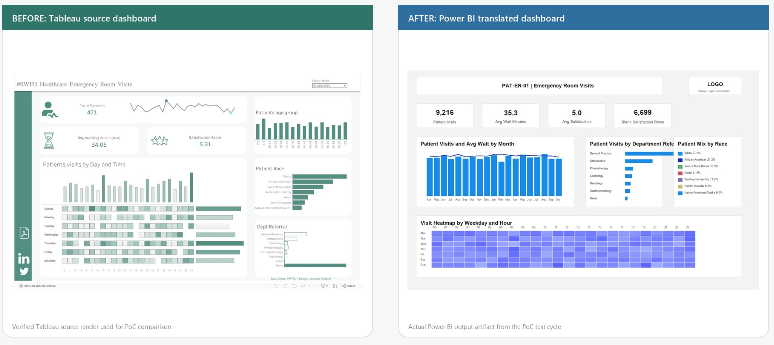
It doesn’t have to happen this way. Our specialized migration teams can run Tableau workbooks through our AI-accelerated conversion tooling, then validate and optimize each output before deployment. For a library of 100 reports, the full migration, including assessment, conversion, validation, deployment, and user enablement, typically completes in eight to 12 weeks. 

Figure 1. Tableau to Power BI Translation: Before/After

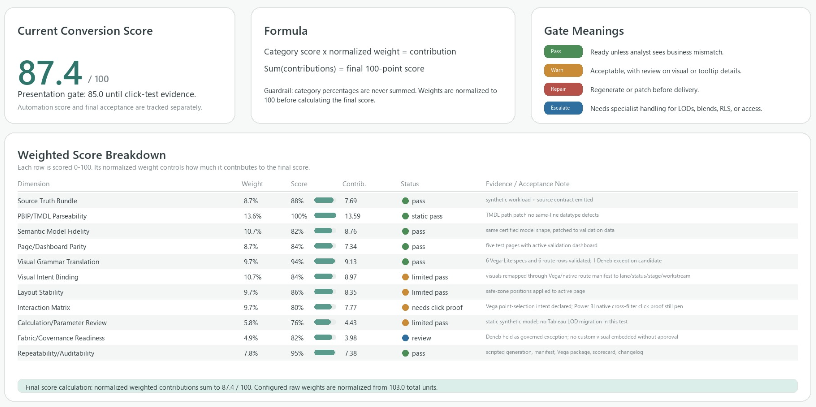
Figure 2. Conversion Scoring Summary

What to Look for in a Power BI Migration Partner 

Not all BI migration approaches are equal, especially in healthcare. You want a healthcare business intelligence partner who understands HIPAA requirements and knows how to configure Power BI workspaces, security roles and data access in a compliant way. You also want someone who can translate your existing Tableau permission structures into Power BI’s role-based access model without leaving gaps. 

Withum’s Power BI Consulting Services  Team has deep experience delivering analytics solutions in healthcare environments, bringing technical expertise, compliance awareness and a repeatable process that keeps projects on track. As a Microsoft Solutions Partner with hands-on Tableau expertise, we understand where you’re coming from and know how to get you where you need to go. Withum has developed an application that automates and migrates Tableau dashboards to Power BI using an AI-accelerated conversion tool in order to replace the daunting manual rebuilds. So, if you’re running Tableau and wondering whether a migration to Power BI is worth it or if it’s the right time, the answer in most healthcare environments is yes, and it’s more achievable than you might think. 

Withum plus signs.

Contact Us

Ready to transition to Power BI? Just reading about visualized data isn’t nearly as insightful as seeing it in action. Contact Withum’s Digital Workplace Solutions Team today to get started.

Let’s Chat

Related Insights

Read more
How AI Agents Automate Workflows
How AI Agents Automate Workflows in Dynamics 365 Business Central

AI agents in Dynamics 365 Business Central work as intelligent assistants that help users to perform and automate routine business processes. They reduce time spent on repetitive tasks such as data entry, document processing or setting up prices. The main benefit of AI agents is that they reduce manual effort and human intervention, improve data…

Read more
Captivating 3D music notes swirling in a golden cosmic background with a mesmerizing light effect.
Fine Print and AI: Examining Google’s Position on YouTube Training Data

As the music industry continues to fine-tune its approach to generative AI, the value attributed to training data is increasingly recognized, negotiated and realized through lawsuit settlements and emerging partnerships. While the central issue in most of these cases has been whether the platforms’ purported use of copyrighted materials constituted infringement or fair use, Google…

Read more
robot hand clicking on cybersecurity icon
Navigating AI Security: Challenges and Best Practices

Artificial intelligence has moved from experiment to everyday business tool. As organizations accelerate AI adoption, AI security has become just as important as innovation. Employees now draft communications, analyze data and even write software with AI assistants — often faster than leadership can put guardrails in place. That speed is a genuine competitive advantage, but…