
Since the creation of SharePoint, the most often repeated comment by far made by users across the wide world has been “Can you make it look less like SharePoint?” or “I love the tool, hate the way it looks. What can we do about that?”. This request has spanned the many years that SharePoint has existed and has prompted the rise of SharePoint developers and swaths of people learning custom coding just to make their sites look a little less like the standard “Out of the box” SharePoint.
Microsoft has been listening and has slowly but surely been improving the overall look and feel of SharePoint design. From SharePoint 2010 to the modern SharePoint Online, the change in look and feel was major. With this SharePoint update, pages were simplified, the tools made easier to understand and place, and gone were the days of switching your page from HTML back to simple to change the layout.
Anytime, Anywhere Access With Withum and SharePoint Online.
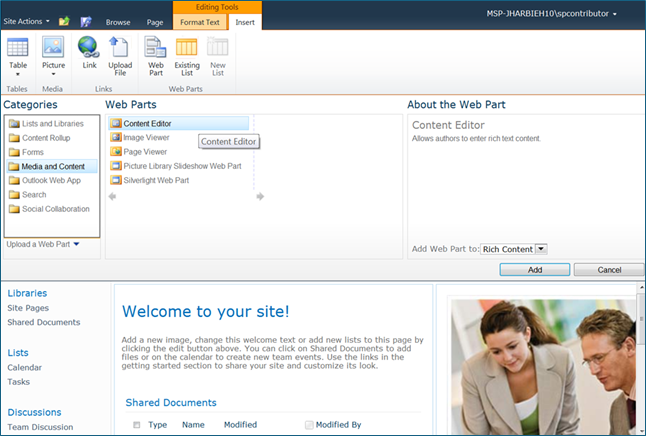
SharePoint 2010 Page Editor Picture
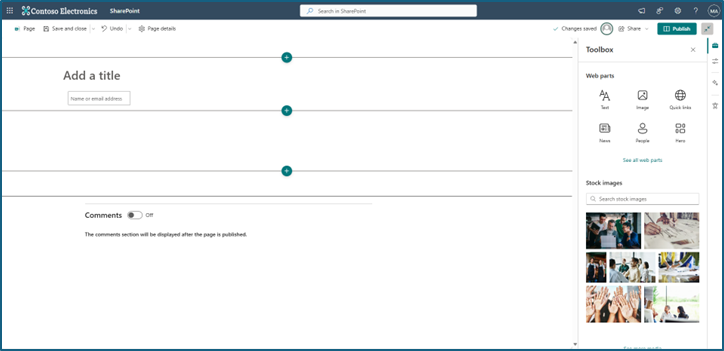
SharePoint Online Page Editor
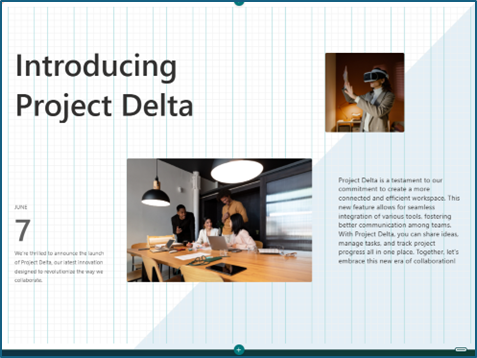
The latest update, rolling out now for Public Preview (February 2025) is the new feature called Flexible Sections. These features aim to enhance the customization and design flexibility of SharePoint pages, allowing users to create more dynamic and visually appealing content. Flexible Sections are a new section type that allows authors to build pages without a strict column structure. Web parts can be dynamically resized and moved within flexible sections to create a fully customized section.
Pros
- Enhanced Customization: Flexible Sections unlock an endless number of design possibilities for sections, allowing for a more personalized and engaging user experience.
- Dynamic Resizing: Web parts can be resized and moved within the section, providing greater flexibility in content arrangement.
- Improved User Experience: The ability to create custom layouts can lead to more visually appealing and user-friendly pages.
Cons
- Learning Curve: Users may need time to get accustomed to the new features and how to use them effectively.
- Potential for Overcomplication: Without proper guidelines, the flexibility might lead to overly complex designs that could confuse users.
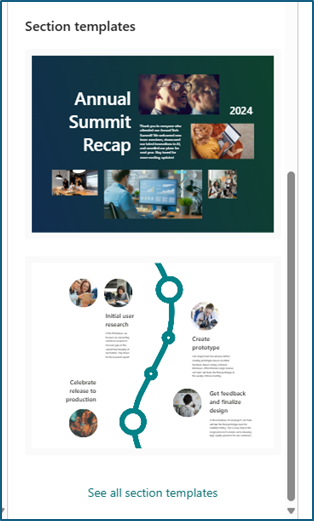
In addition to getting Flexible Sections, there are new Flexible Sections Templates. Section templates have been in SharePoint Online for a little bit of time now, but these new pre-designed layouts that can be added to a SharePoint page are there to showcase the possibilities that Flexible Sections offer.
Pros
- Time-Saving: Templates provide a quick way to add structured sections to a page, saving time on design.
- Consistency: Using templates ensures a consistent look and feel across different pages and sections.
- Ease of Use: Templates are easy to use and can be a great starting point for users who are not familiar with designing from scratch.
Cons
- Limited Customization: While templates provide a good starting point, they may not offer the same level of customization as a blank flexible section.
- Template Limitations: Some templates may not fit all use cases, requiring additional customization.
There is a lot to be excited about with the new Flexible Sections but there is a lot to also keep in mind as users start utilizing these features.
Best Practices
- Plan Your Layout: Before adding flexible sections or templates, plan the layout of your page to ensure it meets your needs and provides a good user experience.
- Use Templates Wisely: Start with templates for common layouts and customize them as needed. This ensures consistency while allowing for personalization.
- Keep It Simple: Avoid overcomplicating your designs. Use the flexibility of the new features to enhance, not overwhelm, the user experience.
- Test and Iterate: Regularly test your pages with users to gather feedback and make improvements. Ensure that pages are tested in different ways, such as resizing browser windows or checking on mobile devices.
Takeaways
The new Flexible Sections and Section Templates in SharePoint Online offer powerful tools for creating dynamic and visually appealing pages. By understanding the pros and cons of this SharePoint update and following best practices, users can effectively leverage these features to enhance their pages and sites. The biggest risk that we might see from this new wave of SharePoint design is users not even knowing they are using SharePoint anymore!