Articles 2 min read

Cyber Matters: Edition 4

Cutting through the noise to highlight the cybersecurity developments most likely to affect your organization: the threats worth acting on and the incidents worth learning from.

Cyber Matters is Withum’s bi-weekly brief on the cyber threats and incidents that deserve leadership attention. Each edition filters two weeks of government alerts, vendor research and incident reporting down to the developments that change risk, and pairs each with practical steps. This edition covers October 26 through November 9, 2026.

What Actually Matters This Cycle

Executive Summary

Attackers walked around controls rather than through them this cycle, slipping past MFA and turning routine software updates into openings. Neglected devices paid the price, and trust itself became the attack path, from a fake job interview to a hijacked update channel.

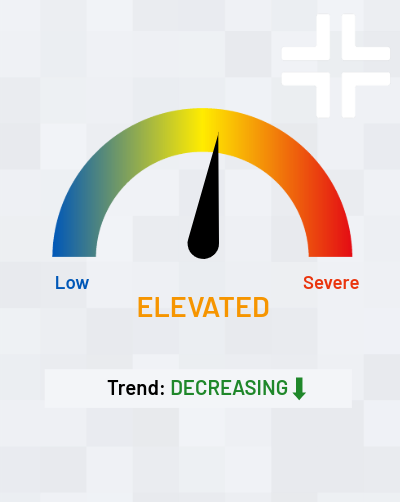
Overall risk this cycle: ELEVATED

A SonicWall VPN flaw let a valid password skip MFA and a WordPress flaw turned the update itself into an opening; ransomware hit outdated Synology storage and a Zyxel switch zero-day hid behind an older, patched bug; and North Korean operators used a fake job interview to help steal a record $6.43 billion from Binance.

Emergent Cyber Threats

New and evolving attack methods to be aware of and steps to reduce your exposure.

On November 6, SonicWall fixed seven flaws in its SonicOS firewall software and warned that one, CVE-2026-19868, may have been exploited. The flaw affects the SSL-VPN only when SAML single sign-on is enabled. An attacker who holds valid credentials for another login method, such as a leftover local account, can bypass the SAML check and the multifactor authentication (MFA) it enforces. CISA added the flaw to its Known Exploited Vulnerabilities (KEV) catalog the same day and set a November 20 deadline for federal agencies. Affected builds are Gen7 7.3.3-7015 and earlier and Gen8 8.2.2-8015 and earlier; SonicWall lists no workaround. Neither SonicWall nor CISA has described the attacks, and it is unclear whether the flaw was exploited before the patch. MFA that guards only one door does not protect the building.

WHAT TO DO
  • Upgrade SonicOS to 7.3.4-7013 (Gen7) or 8.2.3-8015 (Gen8) or later.
  • List every authentication method the SSL-VPN accepts, and disable local or directory logins that bypass SAML.
  • Reset VPN passwords for accounts that can use an alternate login method, and end active sessions after patching.
  • Compare VPN logins with identity-provider sign-in records to find sessions that never passed through SAML.
  • Restrict the firewall management interface to trusted networks; the same advisory fixes two management flaws rated 8.8.

Sources: BleepingComputer, Lawrence Abrams, “SonicWall warns of new SSL-VPN MFA bypass flaw exploited in attacks,” November 6, 2026; SecurityWeek, Eduard Kovacs, “SonicWall Patches Exploited SonicOS Vulnerability That Weakens VPN Logins,” November 7, 2026

Last cycle we reported that an actor tracked as UTA0576 exploited CVE-2026-104935 on fully patched Ivanti Connect Secure gateways. Ivanti has now fixed the two flaws the attackers chained with it: CVE-2026-111357, a privilege escalation, and CVE-2026-118527, which lets an authenticated attacker upload files. Exploitation dates to at least October 1. CISA added both flaws to its KEV catalog on October 30. Rapid7 reports that the attackers stole credentials and queried Active Directory for Windows LAPS passwords and BitLocker recovery keys. Shadowserver tracks more than 5,000 internet-exposed Connect Secure gateways. Patching the first flaw was necessary; it was not sufficient.

WHAT TO DO
  • Install Ivanti’s latest Connect Secure updates, which fix all three chained flaws.
  • Before rebooting or resetting a suspect appliance, preserve its memory and logs.
  • Hunt for compromise after patching; Volexity reports that the activity evades Ivanti’s Integrity Checker Tool.
  • Rotate the LAPS passwords, BitLocker recovery keys and service credentials the gateway could reach.
  • Load Volexity’s published indicators and YARA rules into your detection tools.

Sources: BleepingComputer, Sergiu Gatlan, “Ivanti patches two more Connect Secure zero-days chained in attacks,” November 2, 2026; Help Net Security, Zeljka Zorz, “CISA to federal agencies: Remediate exploited Ivanti Connect Secure vulnerabilities (CVE-2026-111357, CVE-2026-118527),” November 2, 2026

WordPress 7.1.4, released October 28, fixed CVE-2026-119977, a race condition in the core update process. During a full update, WordPress unpacks files into a predictable, web-reachable folder. An attacker who reaches the temporary installer in that brief window can point the site at a database the attacker controls, create an administrator account and run code on the server. No account on the site is needed. Wordfence recorded more than 18,500 probing requests in the first 21 hours, and CISA added the flaw to its KEV catalog on November 3. Fixes were backported to every branch back to 4.7. The moment of updating is now the moment of risk.

WHAT TO DO
  • Confirm that every WordPress site, including microsites and agency-hosted sites, runs 7.1.4 or the patched release for its branch.
  • Check each site’s Updates page rather than assuming an automatic update finished.
  • Block public web access and PHP execution in the wp-content/upgrade folder.
  • Review logs for requests to PHP files under wp-content/upgrade, and look for unfamiliar administrators, plugins or changed files.
  • Ask the hosts and agencies that run your sites to confirm the patch in writing.

Sources: BleepingComputer, Sergiu Gatlan, “CISA flags WordPress RCE flaw as actively exploited in attacks,” November 4, 2026; SecurityWeek, Ionut Arghire, “Fresh WordPress Vulnerability in Attackers’ Crosshairs,” October 30, 2026 (updated November 4)

On November 3, Zyxel published an advisory for CVE-2026-107441, a flaw in the web management interface of ten GS1900 switch models that lets an unauthenticated attacker run commands. Attackers had already used it to compromise 996 switches in 48 countries and steal configurations, hashed root credentials and network details. GreyNoise first tied the campaign, run by a suspected Chinese-speaking actor tracked as Kapibala, to an older flaw Zyxel had patched in June. Researchers at Binarly then found that the exploit checked for, and targeted, switches already patched for that older flaw. Zyxel released fixed firmware on October 22. A patched device was not a safe device.

WHAT TO DO
  • Install Zyxel’s October 22 firmware on every GS1900 switch.
  • Take switch management interfaces off the internet and restrict them to a management network.
  • Rotate switch administrator passwords and any credentials stored in switch configurations.
  • Compare current switch configurations with known-good copies to find unauthorized changes.
  • Bring branch-office and small-office network gear into your vulnerability scanning.

Source: BleepingComputer, Lawrence Abrams, “Zyxel fixes zero-day exploited to hack nearly 1,000 network switches,” November 4, 2026

On October 29, Synology warned that attackers are exploiting a vulnerability it patched in December 2024 to encrypt data on network-attached storage (NAS) devices running outdated DiskStation Manager (DSM) software. Victims find files renamed with a .L0CK3D extension and a note demanding payment for a “C3rb3r Decryptor.” Synology has not named the exact flaw and pointed customers to a 2024 advisory covering three bugs. Shadowserver tracks more than 380,000 internet-exposed Synology NAS devices. Synology rarely issues warnings like this; its last came in 2019. A NAS that holds both your files and your backups is one box to encrypt.

WHAT TO DO
  • Update every Synology NAS to the latest DSM release for its model, and enable automatic updates.
  • Remove port forwarding to DSM management and SSH, and use a VPN for remote access.
  • Turn on two-step verification and disable the default admin account.
  • Keep at least one backup copy offline or somewhere the NAS cannot write to.
  • Search for .L0CK3D files, read-me3.txt notes, unknown administrators and unfamiliar scheduled tasks.

Sources: BleepingComputer, Sergiu Gatlan, “Synology warns of C3RB3R ransomware attacks targeting NAS devices,” November 2, 2026; Synology, “Synology urges users to update DSM following ransomware attacks on outdated DSM versions,” October 29, 2026

Recent Incidents

Real-world breaches and the lessons they carry for organizations like yours.

On or about October 29, attackers stole more than $6 billion in cryptocurrency from Binance, and on October 31 the FBI attributed the theft to TraderTraitor, a North Korean group. Binance’s November 3 account describes a patient, multi-stage campaign. In June, an engineer downloaded a trojanized installer for a popular AI tool found through a search engine. In September, a fake recruiter put a second engineer through two rounds of interviews and had him download a coding “assignment” onto his work computer. On October 20, the attackers abused an internal AI tool to reach other engineers’ machines, and on October 29 they used a stolen container deployment token to reach a wallet signing service. The $6.43 billion haul is the largest cryptocurrency theft on record; about $2.85 billion has been frozen. Your hiring process and your developers’ laptops are part of your attack surface.

WHAT TO DO
  • Forbid running outside code, including interview “assignments,” on work devices; use isolated, disposable environments instead.
  • Install developer and AI tools only from approved sources, never from search results.
  • Keep deployment and signing tokens off laptops, make them short-lived, and require a second approval for high-value actions.
  • Limit what internal AI tools can reach, and log what they do.
  • Warn engineers, finance staff and executives that fake recruiters now run convincing multi-round interviews.

Sources: The Hacker News, Ravie Lakshmanan, “Binance Reveals How Fake Job Interviews and AI Tool Abuse Led to $6.43 Billion Theft,” November 3, 2026; FBI, “North Korea Responsible for $6 Billion+ Binance Attack,” October 31, 2026

On November 2, an attacker used compromised credentials to enter the update system of cPGuard, a security suite for Linux web-hosting servers, and pushed a malicious script in versions 5.88.12 through 5.88.19. The script installed a backdoor and collected password hashes, root SSH keys, the MySQL root password and root’s shell history. The vendor, OPSSHIELD, says about 2,950 customer servers ran it and traced the attack to a break-in at its billing and licensing server. The attacker also copied three of OPSSHIELD’s cloud servers and took billing records for about 7,900 customer accounts. OPSSHIELD detected the attack within 12 hours. Updating removes the backdoor but does not cancel the stolen credentials. The tool meant to protect the server became the way in.

WHAT TO DO
  • If you or your hosting provider run cPGuard, update to the latest version and confirm the script’s leftover files are gone.
  • Treat any server that installed versions 5.88.12 through 5.88.19 as compromised, even after updating.
  • From a trusted environment, reset root and local passwords, rotate database passwords and cloud keys, and replace SSH keys.
  • Remove the old public keys from every system that trusted them.
  • Ask hosting and managed service providers which security agents run on your servers and how they protect those update channels.

Sources: The Hacker News, Swati Khandelwal, “cPGuard Update Channel Hijacked to Backdoor Linux Servers and Collect Password Hashes,” November 3, 2026; BleepingComputer, Bill Toulas, “Hackers hijack cPGuard autoupdate to deploy backdoor, steal data,” November 3, 2026

DreamHost, a web host that touts about 400,000 paying customers, confirmed that an intruder exploited a vulnerability in its web-based File Manager from about August until October 23, when the company discovered it. The attacker captured the FTP/SFTP usernames and passwords of customers who logged in during that period and reached certain webmail systems, obtaining session information for a limited number of users. DreamHost has fixed the flaw, ended sessions and reset passwords. It says “well under 10%” of customers were affected but has not given a number or named the flaw, and it found no evidence of access to control-panel logins or billing details. Two months of quiet access is long enough to plant malware in a website or read a mailbox.

WHAT TO DO
  • If you use DreamHost, change FTP/SFTP and email passwords, and any other password you reused.
  • Check website files for unauthorized changes and webmail for new forwarding rules and filters.
  • Replace password-based FTP with key-based SFTP, and turn on two-factor authentication.
  • Watch for phishing and invoice fraud sent from, or impersonating, affected mailboxes.
  • Ask each host and registrar how quickly it would detect a breach and tell you.

Sources: BleepingComputer, Bill Toulas, “DreamHost confirms data breach exposed FTP logins and webmail sessions,” November 4, 2026; TechCrunch, Zack Whittaker, “Hackers stole DreamHost customer files and inboxes during months-long attack,” November 4, 2026

On October 26, the University of New Mexico Health Sciences Center detected a network intrusion at about 11:30 a.m., and some 40 minutes later told staff to shut down and unplug computers. Its hospitals, which include New Mexico’s only Level 1 trauma center, diverted ambulances and cancelled that day’s clinic appointments. Systems came back the next day, and the university says the event affected some end-user devices but did not reach core systems or servers. An extortion group called BYOD claims to have stolen student and employee data, including Social Security numbers, from 36,000 machines; those claims are unconfirmed. Fast containment kept a one-day outage from becoming a long one.

WHAT TO DO
  • Name who can order an emergency network shutdown, and rehearse the decision.
  • Keep downtime procedures and paper workflows ready for clinical and other critical operations.
  • Arrange diversion or mutual-aid agreements with nearby providers and partners in advance.
  • Prepare statements for staff, students and customers for the day an extortion group posts claims you cannot yet confirm.
  • Monitor leak sites for your organization’s name and those of your key vendors.

Source: Help Net Security, Zeljka Zorz, “Cyberattack disrupts University of New Mexico hospitals, extortion group claims attack,” October 27, 2026

The Bottom Line

Three themes tie this cycle together. First, attackers walk around controls instead of breaking them: the SonicWall flaw skipped MFA, the WordPress flaw exploited the update itself, and the Ivanti chain evaded the vendor’s own integrity checker. Second, neglected devices carry the most risk: Synology storage, Zyxel switches and Connect Secure gateways fell because no one owned their patching or because a patch was assumed to be enough. Third, trust is now the attack path: a fake recruiter, a security tool’s update channel and a hosting provider’s file manager each gave attackers access that looked legitimate.

Three Actions to Take Right Now

Patch SonicWall SSL-VPN, Ivanti Connect Secure, WordPress, Zyxel GS1900 switches and Synology DSM this week, then hunt for signs of earlier compromise.

Map every login path into remote access and email, and close any path that skips MFA.

Keep untrusted code off work devices, and rotate the credentials that vendors, updates and hosted systems can touch.

Withum plus signs.

Have Questions or Need Guidance?

Want help assessing how these developments could affect your organization? Withum’s Risk Advisory and Assurance Services Team can help identify potential exposure and prioritize next steps.

Contact Us

Related Insights

Read more
University hospitals cybersecurity breach.
Lessons From the University Hospitals Cyber Incident: A Healthcare Leadership Perspective

University Hospitals (UH), an 18-hospital system based in Cleveland, has spent the past week recovering from a cybersecurity incident that took digital services offline and led to the rescheduling of some appointments and elective procedures. The incident remains under investigation, and the facts may change. Even so, the disruption already raises practical questions for every…

Read more
cyber team analyzing security breaches
Cyber Matters: Edition 3

Reporting window: October 12 – October 26 (trailing 14 days) Cyber Matters is Withum’s bi-weekly brief on the cyber threats and incidents that deserve leadership attention. Each edition filters two weeks of government alerts, vendor research and incident reporting down to the developments that change risk, and pairs each with practical steps. This edition covers…

Read more
a digital forensics specialist pulling data off of an external hard drive.
Digital Forensics and Incident Response: Your Team After the Breach

It is Cybersecurity Awareness Month again. Along with the ubiquitous ads hawking pumpkin spice this and pumpkin spice that, it is also the time of the year where you become inundated with why you should employ cybersecurity and what could, and will, happen if you don’t. Given the volume of data your organization protects and…

This brief is for general informational purposes only and is not legal or professional advice. It reflects public reporting available as of November 9, 2026.