
So, your company is making the switch to Microsoft Teams, and you were given nothing but a “this is happening” alert from management. Or maybe your organization has been using Teams for a while and you are struggling to fully integrate into the system. What is an employee to do?! Don’t worry; Withum has your back!
The switch from an old system to a new one is always a bit of a shock, no matter how prepared you might be. A change in systems that you use every day is always nerve-wracking, but it’s nothing that you can’t handle, I promise.
I myself felt the one-hit knockout due to a sudden system switch to Teams, so I’m sharing with you what I have learned and what helped me move ahead with confidence:
What even is Teams?
- Microsoft Teams is coined by Microsoft as “… the ultimate messaging app for your organization—a workspace for real-time collaboration and communication, meetings, file, and app sharing, and even the occasional emoji! All in one place, all in the open, all accessible to everyone.”
- That definition roughly translates to Microsoft Teams is an app that you can either access on your desktop or through a webpage that allows users to easily work with other people together in a shared environment. The app combines chat, meetings, calling and file sharing all in one consolidated place.
Okay, but how does it work?
- The easiest way to describe Teams is that it takes SharePoint and makes it easier to collaborate. SharePoint is a document management platform that isn’t difficult to work with on its own, but when you want to collaborate and discuss files, it’s not the experience that one might want. Teams comes in here.
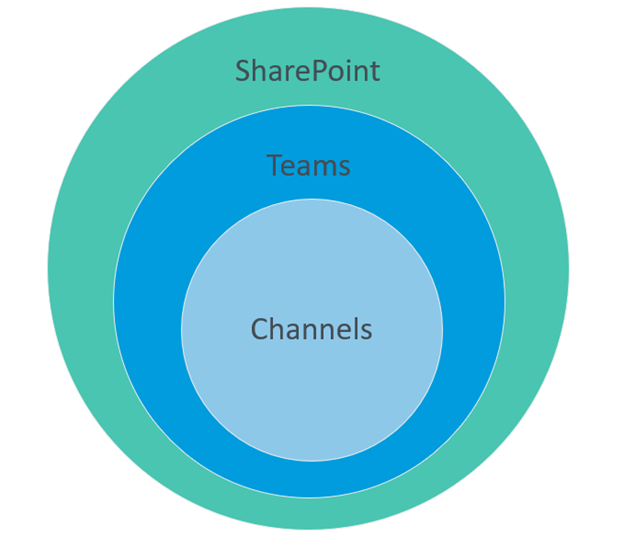
- Teams and SharePoint are connected, and you can think of it as a parent/child relationship. You can have a SharePoint environment without Teams, but you cannot have a Teams environment without SharePoint.
- Then where the parent and child work, live and eat are the Teams channels. These channels are where you will see your conversations/posts and upload/share files. Every team will have a “General” channel and can have up to 200 channels per team.To keep it simple, you work in a channel that lives in a team. That team lives within SharePoint. Another way to look at it might be the channel is my department, the team is my building and SharePoint is the company where we all work.
- The teams you can see and access are set by “Team Owners”. When a team is created, it can either be private or public. For private teams, you will need to be directly added to by the owner of the team to see and interact with the content. Public teams can be joined by any user who is part of your organization, and those users don’t necessarily need to be added manually to the team. Consequently, any organization user can see any and all content in a public team with public channels.
What can I do in Teams?
A lot … but I know you’re not just here for that, so here’s a non-exhaustive list of some of the things you can do in Teams:
- Instant message other users
- Create group chats
- Start conversations around files
- Easily share files, photos and videos with team members
- Host and join meetings that can be recorded and shared
- Connect OneNote and other Microsoft applications
There are also hundreds of applications that connect within Teams, such as:
- Survey Monkey
- Trello
- PowerBI
- AttendanceBot
- And many more
Teams has numerous features, customizations and, being a Microsoft product, it’s always improving on itself by adding more functionality and connectivity.
So that’s cool (right?), but what should I know before I am plunged headfirst into the cold waters of Microsoft Teams?
Here are your water wings:
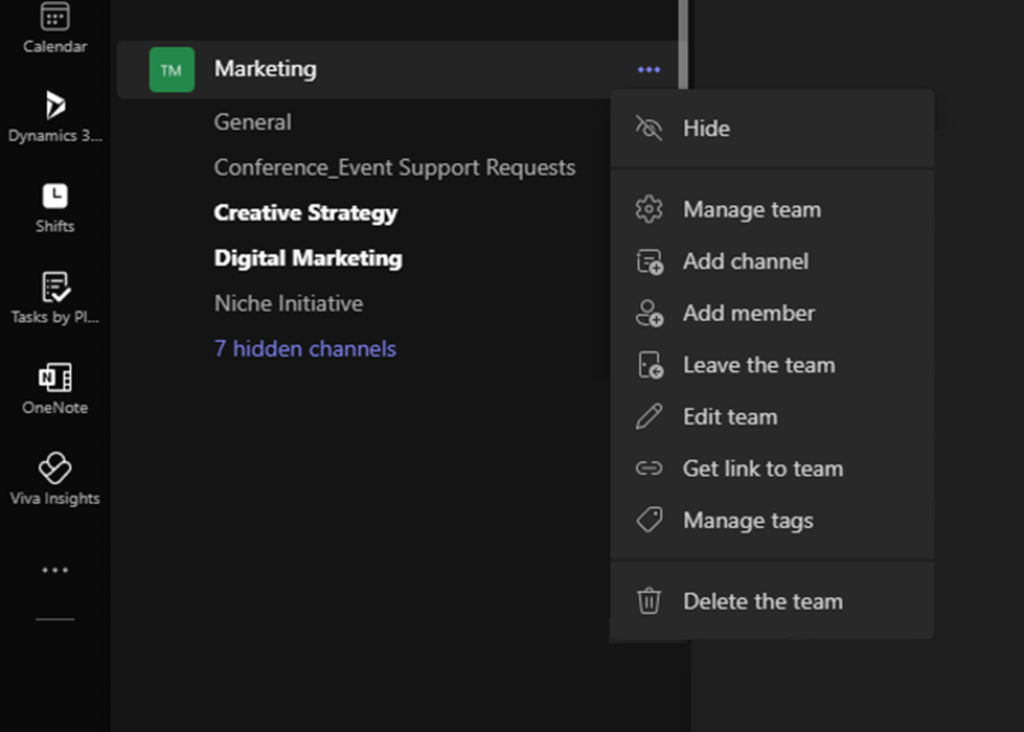
- Don’t let yourself get overwhelmed. Teams is an excellent tool, but it can absolutely get overwhelming visually. Utilize the “pin” and “hide” features as needed to keep your space organized.
- Leave teams or channels you don’t need to be in. In keeping with staying organized, if you find yourself in a team that you don’t need to be in anymore or were mistakenly added to, you can leave the team! Clicking on the “…” next to the team name, then click “Leave the team”.
- Understand how access works. Teams has very detailed permissions, most of which you won’t need to worry about, but if you find yourself either missing a team or a channel you will need to be added. You can reach out to the team owner, and they can add you.
- Use the Files button. Quickly finding the file you were just working on 5 minutes ago in Teams can sometimes be hard to find again. Use the Files button on the left side navigation, and you will be able to see all the files you have recently worked on. It can save you a lot of time and headaches spent hunting through your teams.
- Search is your friend. No matter where you go in Teams, the search bar is always on the top of the page. Search can easily help you find either a person, a specific team or channel, a file or even a specific conversation. The search feature can quickly take you to wherever you need to go within Teams.
- Resources, resources, resources. Microsoft has tons of materials that can help you find an answer to almost any question on the Microsoft Documentation site. Additionally, if you want to learn more about Teams, check out our “Microsoft Teams Overview” page and our article “Top 10 Microsoft Teams Tips and Tricks You Need to Know”.
I hope this quick crash course has helped you feel more confident in understanding Teams and can be the first step in helping you in your journey to becoming a Microsoft Teams fan and connoisseur.