Tracking Vendor Information for 1099
Each year businesses are beginning to file more and more 1099 forms. After the implementation of the Taxpayer First Act of 2019, which lowered the mandatory e-file threshold for information returns from 250 to 10 or more forms (aggregated across all types) the number of forms filed with the IRS are estimated to be in the billions. Knowing which form to use and how to track the information is essential for your business.
What Is a 1099 Form?
Form 1099 is an IRS document used to track money paid to non-employee vendors during the year. There are a few 1099 forms that the IRS uses. For the tax season covering the calendar year ending 2025, the two needed are the Form 1099-MISC (Miscellaneous Income) and the Form 1099-NEC (Non-Employee Compensation). Both forms need to be issued to the recipients once they are prepared by January 31, 2026.
Do I Need to File a 1099-MISC?
You are required to file a 1099-MISC form for anyone that you paid $600 or more in the calendar year. Unlike the 1099-NEC, the payments found on a 1099-MISC will now be geared towards vendor rent payments, royalties, attorney fees, healthcare payments and other individuals who are not considered independent contractors.
Do I Need to File a 1099-NEC?
You are required to file a Form 1099-NEC for any non-employee that you paid $600 or more for services performed in the calendar year. You’ll also need to file a Form 1099-NEC for any non-employee you’ve withheld any federal income tax from under the backup withholding rules. According to the IRS, the people for whom a business should use the new1099-NECare those non-employees identified as contractors, freelancers, or any other non-employee.
The IRS has rules to decide if a worker is an employee or an independent contractor. For assistance on how to classify your workers please check out our Employee Classification Tool.
What Info Is Needed for the Form 1099s?
Now that you know who you need to issue a Form 1099 to, you will need some to track in your accounting system:
- Legal Name
- Type of Entity
- EIN or Social Security Number
- Address
- Optional: email address if using a third-party application to efile the forms.
The easiest way to get this information is to have your vendors complete and send to you, along with their billing invoices, an IRS Form W9 or Form W8BEN.
Need help preparing your 1099? Read our 1099 Preparation Guide for key requirements and deadlines.
How to Track info in your Accounting System?
In most accounting systems, tracking vendors to be issued Form 1099s at year end is done under the Vendor Profile area as seen below.
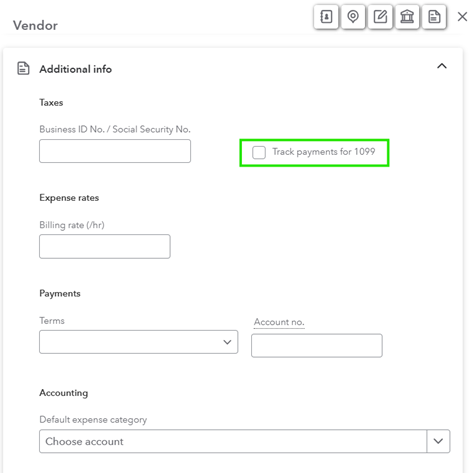
In QuickBooks Online, if you’re creating a brand-new record for the contractor, you would go toCreate and then Add vendor. If you know the contractor’s Employer Identification Number (EIN), at the bottom of the screen, enter it on the Business ID No. line. You can add this number later; just remember to do so before it’s time to file. Check the box that says, “Track payments for 1099” and QuickBooks will add the independent contractor to the tax filing module:
There are others way of tracking as well via workflow tools such as:
- BILL – third party cloud-based application where bills are processed and paid, and documents are stored and synced to accounting.
- Payroll Service – include payouts as part of your payroll processing, thus all the vendor info (name, address and Federal ID #s).
These tools will help you streamline your internal processes and provide the stored data needed to process the required year-end tax forms.
Determining the correct forms to file and the information needed to prepare the forms is half the battle. Keeping detailed records and using digital tools to streamline processes as much as possible can help you stay on top of all the requirements without a lot of extra time and effort.
Author: Ana Costa | [email protected]
Your Tax Strategy Simplified
With continued shifts in tax policy, staying proactive with your tax planning can help you take advantage of new opportunities and avoid unexpected liabilities. Withum’s Tax Planning Resource Center provides timely insights, planning tips and compliance reminders tailored to your needs.